Make every take the best take with AISuite

Boost video quality, align eye contact, and enhance audio with secure, compliant AI built for enterprise scale.

Always sound crisp and look confident with AISuite’s one-click magic ✨

Eye Contact

Stay naturally connected on camera

AI subtly adjusts your gaze so you appear focused and confident, even while reading notes or a script.

Maintain natural eye contact with your audience

Build trust and connection in every video

Read freely without breaking focus

Studio Voice

Get that studio sound, even from your kitchen table.

Deliver crisp, studio-quality sound on every recording, no matter where you are or what device you use.

Maintain clear, consistent audio across all videos

Elminate background noise and echo

Perfect for clips, podcasts, and more

Get a demo
Get a demo

Sharpen

Give every video a clean, polished look

Enhance lighting, color, and contrast while reducing blur and visual noise for a sharper final result.

Balanced color and crisp detail

Reduced blur and grain

A professional finish in one click

Super Resolution

Unlock 4K quality from any video

AI upscaling transforms lower-quality footage into sharp, high-definition 4K content.

Sharper, more detailed visuals

Upgrade old footage to 4K

Consistent, professional quality

720p 👉 4K

Ready to see AISuite in action?

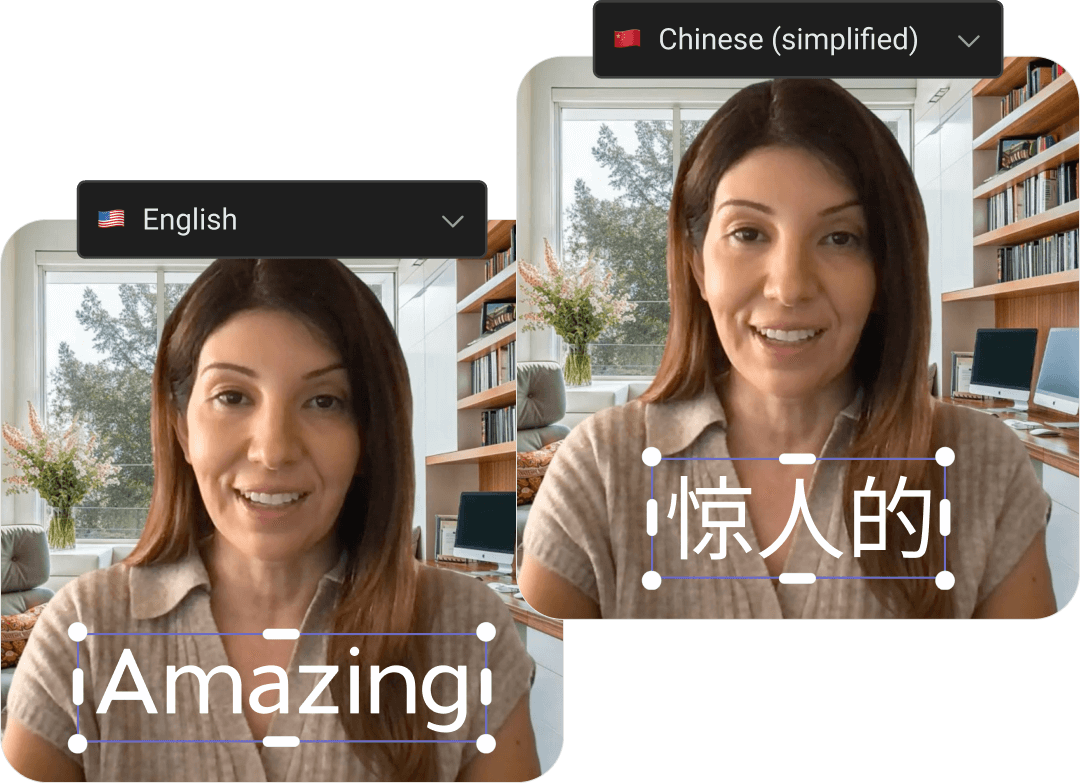
Translations

Reach global audiences with subtitle translations in over 75 languages.
Learn more
Learn more
Video of woman with subtitles translated from English to Chinese

Recent AISuite news

Blog
Make your contributors sound like professional podcasters
Product
5 min read

Audio quality can make or break a video experience.

Even when the visuals are strong, distracting background noise, inconsistent volume, or unclear speech can make content feel less polished and reduce engagement. And not every contributor records in a perfect environment — sometimes it’s a quiet office, other times it’s a busy home setup, conference floor, or shared workspace.

But audiences increasingly expect crisp, clear audio that sounds polished and professional — more like a podcast or studio recording than a webcam call.

That’s why Socialive is introducing new Studio Voice enhancement levels, giving creators more control over how their recordings sound.

With three preset enhancement options — Subtle, Balanced, and Strong — contributors can now tailor audio cleanup and enhancement based on their recording environment and desired output quality.

Whether you want a light polish or a fully refined, studio-quality sound, Studio Voice helps contributors sound more confident, professional, and engaging directly within the workflow.

What’s new

Studio Voice now includes three selectable enhancement levels that can be applied to recordings.

This update gives creators greater flexibility while making it easier to achieve the kind of clean, polished sound audiences associate with professional podcasts and studio productions.

The three enhancement levels include:

Subtle

Subtle enhancement applies a light touch of audio cleanup while preserving the natural tone and texture of the speaker’s voice.

This option is ideal for:

  • Quiet recording environments
  • Minimal background noise
  • Authentic, conversational recordings
  • Situations requiring only light cleanup

Subtle enhancement helps smooth out minor distractions without significantly altering the original sound.

Balanced

Balanced enhancement applies moderate cleanup and vocal enhancement, reducing background noise while improving clarity and consistency.

This is the recommended setting for most recordings and works well across a wide variety of environments.

Balanced enhancement is ideal for:

  • Everyday business recordings
  • Hybrid work environments
  • Internal communications
  • Thought leadership videos
  • Customer-facing content

It delivers polished, podcast-style clarity while still maintaining a natural and authentic sound.

Strong

Strong enhancement applies the highest level of audio refinement, delivering a cleaner, more polished sound similar to a professional studio recording.

This option is best suited for:

  • Noisy recording environments
  • Echo-heavy rooms
  • Lower-quality microphone setups
  • Recordings needing significant cleanup
  • High-importance external content

Strong enhancement helps eliminate distractions and improve intelligibility so contributors can sound polished and professional regardless of their environment.

Why this matters

Creating professional video content should not require expensive microphones, soundproof studios, audio engineers, or post-production expertise.

Studio Voice helps organizations remove many of the barriers that traditionally prevent teams from creating polished video content consistently at scale.

With enhancement levels, contributors can now adapt audio processing based on their recording conditions instead of relying on a one-size-fits-all approach.

This provides several key benefits:

  1. More control over audio quality: Creators can choose the enhancement level that best matches their environment and communication style.
  2. Consistent, professional sound across teams: Whether employees are recording from home, the office, or while traveling, Studio Voice helps maintain a polished and consistent listening experience across all content.
  3. Faster, simpler workflows: There’s no need for additional audio tools or advanced editing knowledge. Contributors can improve audio quality directly within the recording workflow.
  4. Greater confidence on camera: When contributors know they’ll sound polished and professional, they can focus more on delivering their message naturally and authentically.

Professional audio without the complexity

Studio Voice is part of Socialive’s broader vision to make high-quality video creation accessible to everyone across the enterprise.

By embedding intelligent enhancements directly into the workflow, organizations can empower employees, advisors, executives, and subject matter experts to create content that looks and sounds professional — without requiring production expertise.

With the new enhancement levels, achieving podcast-quality audio is easier and more flexible than ever, helping teams create better videos faster.

Blog
Preserve picture quality with Super Resolution and enhance picture quality with Sharpen
AI
5 min read

Key takeaways:

  • Super Resolution upscales video from as low as 540p to 4K
  • AI-powered feature preserves quality and clarity
  • Super Resolution included in Enhance pillar of AISuite
  • Sharpen uses AI to add pixels and boost clarity

Video enthusiasts and video editors know the pain of upscaling content. It’s a pain to make lower-resolution videos look good on a larger screen. You can’t just stretch a 540p video to 4K without serious blurring and drops in quality.

That changes with Super Resolution, Socialive’s newest addition to the AISuite.

Unlock 4K quality from any video

Thanks to Super Resolution, you can upscale videos to 4K with the click of a button. The new AISuite feature preserves the original quality of your content by adding pixels and increasing your video's size. This allows you to record with a lower-resolution camera (like the 720p in most enterprise laptops) and display the video on a high-resolution monitor without losing any quality.

This means old videos captured in lower-end HD, recordings from lower-quality cameras, and even files compressed to lower bitrates for livestreams can be transformed into 4K with Super Resolution.

Think of Super Resolution as a way to digitally zoom in and “blow up” your video. AI adds pixels in the background to create a much larger image without distorting your content.

The benefits of Super Resolution

OK, so that’s the magic of Super Resolution, but the benefits go well beyond the output itself. There are quite a few benefits to both presenters and editors.

No more reshoots

A lower-resolution recording used to result in an instant reshoot. Working with a lower-res camera (like the company laptop) or a presenter who forgot to record at the camera’s highest resolution meant you’d have to try again later. It usually wasn’t until the editor got hold of the file, pulled it into Premiere, and saw the recording in a tiny letterbox at the center of their project preview window.

This doesn’t work — especially if your talent nailed the take.

Super Resolution upscales the file to 4K, whether it was recorded in Socialive or not, saving all the wasted time (and the producer from an awkward conversation).

Second life for older content

The fact that content doesn’t need to have been created in Socialive to apply Super Resolution means that you can bring older videos into 2026-ready quality.

Say you have a video that came from a 2020 livestream. It was probably recorded in either 540p or 720p — 4K is too large a format for livestreams. With Super Resolution, you can now generate a 4K file of that livestream. 

This is especially helpful if there was a great piece of live content that you’d love to repurpose into other pieces of content.

Go big with large displays

Playing low-resolution videos on a big screen is always a no-no. Even if a video looks OK on a mobile device in landscape mode, it would look awful if you tried to use it on an auditorium display.

Socialive has your back in this scenario as well. Super Resolution allows you to upscale the video into a format that will look crisp, clean, and professional on the biggest stage.

Enhancing clarity automatically with Sharpen

So what if you wanted to keep your 1080p video the same size, but just wanted to make it look a bit clearer? That's where Sharpen steps in.

Sharpen uses AI to essentially fill in the gaps in the picture. The platform analyzes each image, each frame, and generates additional pixels that increase the quality of the video without changing the size.

Sharpen helps you showcase all the subtle details in videos. After running the video through Sharpen to clean it up and Super Resolution to maximize the size of your content, you can see smaller details, such as the small lettering on a book in the background. This level of detail removes distracting visual noise and unintentional soft blurring from your video and creates a sharp, high-quality video.

This used to be a cumbersome, tedious process that in many cases might not even be possible. If your speaker nailed the take, but the picture quality didn't live up to enterprise standards, it used to mean a lost take — wasted time and effort. Sharpen reduces blurry or grainy noise to generate crisp picture quality in videos.

It's just another way the AISuite lives up to its "no retakes" mantra.

What else is available in AISuite

Super Resolution is available now in Socialive’s AISuite. It launches alongside a pair of powerful Enhance features: Studio Voice and Eye Contact.

Studio Voice will give your presenters the sound of recording in a podcast studio — without the expensive equipment. Check out more details about Studio Voice here.

Eye Contact gives your presenters a more authentic look — and they don’t have to worry about the perfect take. Check out more details about Eye Contact here.

Blog
2026 AI video creation trends: What works best for regulated industries
AI
5 min read

As we enter 2026, artificial intelligence is no longer a curiosity — it’s becoming a strategic force shaping how enterprises create, manage, and scale video content. For highly regulated industries, such as financial services, insurance, legal, and healthcare, the question isn’t whether to use AI in video creation, but which approaches actually work at scale without introducing unacceptable risk.

There are four major AI trends shaping video creation. Here’s the impact regulated organizations can expect.

Trend 1 — Traditional outsourced models using AI tools

What traditional outsourced models look like

Agencies and production partners applying AI to enhance editing, cleanup, or translation in isolated project workflows.

Why it still matters

  • Good for high-production, flagship content
  • Agencies can deliver better post-production results with AI assistance

The real limitation

  • Costs scale with volume
  • Workflows remain fragmented
  • Compliance and review happen after production, not as part of the process

McKinsey proves planning is critical

This trend represents incremental improvements, not transformation, and as McKinsey & Company’s enterprise AI research shows, most organizations have not moved beyond pilots into scaled use because the underlying workflows weren’t redesigned for AI impact.

Trend 2 — Standalone generative AI video tools

What are Generative AI video tools

Text-to-video, avatars, and prompt-based creation tools that generate content quickly.

Where they work

  • Rapid ideation and concepting
  • Internal, low-risk content

Where GenAI fails for regulated enterprises

  • Hard to govern or audit outputs
  • Difficult to ensure consistent brand, regulatory, or compliance controls
  • Minimal support for enterprise security

McKinsey shows GenAI needs to be integrated

McKinsey’s latest surveys show that while 88% of enterprises use AI in at least one function and generative AI experimentation is widespread, most organizations have not yet scaled these efforts or embedded them into core workflows.

This means you can generate faster, but without the right systems in place, you cannot operationalize at the enterprise level.

Trend 3 — Embedded, cloud-based AI across the full workflow

What embedded AI workflows look like

AI capabilities built directly into end-to-end video platforms — from capture through review, approval, and publishing — rather than as separate add-on tools.

Why embedded workflows matter for regulated industries

  • Keeps governance, audit trails, and permissions in one system
  • Reduces risk and compliance burden by design
  • Turns AI from an adjunct tool into an embedded workhorse

Gartner predicts increased AI deployment

Industry analysts are pointing to this shift as critical. Gartner predicted that more than 80% of enterprises will have deployed GenAI-enabled applications in production by the end of the year, reflecting a move from experiments toward practical, embedded AI models.

Moreover, in the coming years, we’ll see task-specific AI agents deeply integrated into enterprise software, rather than as isolated pilots.

This trend aligns with broader AI adoption research showing that the highest ROI comes when AI is built into business processes and workflows, not bolted on

Trend 4 — AI-driven localization & accessibility built in

What built-in AI localization looks like

AI translation, transcription, and accessibility that is part of the core workflow — not a separate step.

Why it works

  • One video asset reaches global audiences
  • Meets regulatory and accessibility requirements with fewer handoffs
  • Reduces reliance on external vendors and lowers cost

Why built-in localization is key

Unlike manual or outsourced models, this trend treats localization as default, not optional — an operational capability, not a special project.

The key distinction in 2026

The biggest evolution isn’t smarter AI models — it’s where AI lives and how it’s managed.

Outsourced + AI-enhanced tools help individual projects. Embedded AI in cloud workflows changes how video is created, reviewed, and scaled.

Multiple industry analysts are pointing to this shift:

  • McKinsey reports most organizations are still experimenting with AI and have not yet captured broad enterprise-level impact — largely because use isn’t embedded into workflows.
  • Gartner forecasts widespread GenAI adoption, but warns that many early AI projects — especially standalone agentic or hype-driven ones — fail to deliver real ROI without strategic planning and integration.

In other words, AI that is integrated, governed, and workflow-native will outperform AI treated as a point tool.

What this means for regulated enterprises

For organizations where compliance, brand integrity, and auditability matter:

✅ Build AI inside core systems — not beside them

✅ Prioritize solutions with governance, security, and audit baked in

✅ Treat video creation as an operational capability, not a boutique deliverable

✅ Measure success with business impact — not just experimental outputs

Throughout 2026, the safe, scalable application of AI will be a competitive necessity, not a fringe advantage — but only for enterprises that embed it into end-to-end workflows, not just into isolated projects.

In video creation, tools like Socialive’s AISuite that are built directly into powerful video creation workflows truly stand out. Regulated industries will get the most out of AI in 2026 by using applied, embedded AI to supercharge workflows that are built to scale.

Blog
Enhancing authenticity with Eye Contact in AISuite
Product
5 min read

Key takeaways:

  • Eye Contact automatically aligns a presenter’s gaze
  • Focusing on the camera helps presenters connect with the audience
  • Studio Voice included in AISuite

Sometimes it’s tough to look and feel your best in videos, especially if you have a habit of looking off-screen or are locked in reading a teleprompter.

Eye Contact is here to help.

The AI-powered feature works behind the scenes to keep your eye level in line with your camera. So if your eyes are darting all over the place, we can fix it!

Eye Contact is just one of the many new features prominent in Socialive’s AISuite — here’s how it works.

Keeping your eyes on the prize

For talking head videos with a single speaker, it goes a long way when the presenter looks into the camera. We feel more comfortable with someone who looks us in the eye — we feel like we can trust that person a bit more.

But maintaining eye contact can be tough. For many people, continuous eye contact feels awkward or just isn’t possible. You also have to consider that someone might be reading from a teleprompter or referring to their notes. None of those should be a reason to scrap an otherwise great recording.

Eye Contact cleans up your recording to add that little extra touch of humanity — while using AI.

The great thing about Eye Contact is how subtle it actually is. While the above stills show an obvious moment when the speaker looks away, over the course of a longer video, it feels more natural. You’d hardly notice it if you weren’t looking, but Eye Contact guarantees your speaker will continue to address your audience directly.

Eye Contact in action

Notice in the above video how the speaker's eyes remain on the camera — positioned above his laptop — even as he reads from the teleprompter located in the middle of his screen. He’s an energetic speaker, so Eye Contact guarantees that all of his energy is directed towards the audience.

The benefits of Eye Contact

So, outside of subtle adjustments, how does Eye Contact help video creation? Well, if you’ve ever worked with a nervous speaker, you’ll feel the impact immediately.

Time savings

There’s no need to worry about reshoots because of darting eyes. Nervous speakers tend to look across the screen, trying to find something comfortable they can latch onto.

Likewise, if you have a subject-matter expert or speaker who is trying to nail precise messaging, you may want them to read from a teleprompter. But reading from a prompter is an art form — most people will end up reading line by line, their eyes cruising along and pinging back and forth like a typewriter.

Eye Contact fixes that automatically.

What else is coming with AISuite

Eye Contact is just one of the major new features launching in AISuite.

Studio Voice will give your presenters the sound of recording in a podcast studio — without the expensive equipment. Check out more details about Studio Voice here.

All resources
All resources